SurveyJS v3.2.0
Released: October 6, 2026
SurveyJS v3.2.0 introduces AI tools and resources, collaborative form filling and editing, a dynamic content API for PDF exports, and a matrix base-class breaking change, along with bug fixes and minor enhancements.
For an overview of the major features introduced in SurveyJS v3.0, see:
AI Tools and Resources
SurveyJS provides resources to help AI coding agents find current documentation and follow SurveyJS development workflows. Use agent skills for task guidance, the MCP server for documentation lookup, and Markdown pages for specific guides and examples. The CLI setup commands below require Node.js 22 or later.
SurveyJS MCP Server
The SurveyJS Model Context Protocol (MCP) server gives AI coding agents tools to search current documentation and look up API details while working on your code. Agents can check newer features that their training may not cover, helping reduce outdated suggestions and the need to paste documentation into prompts.
To configure a connection for VS Code, run the following command from your project folder:
npx surveyjs-cli@latest install-mcp --editor=vscode
Replace vscode with your editor's name, or omit --editor to choose from a list. The CLI saves settings in the project by default so that you can share them with your team. Add --user to save settings for your user account instead.
For manual setup, use https://mcp.surveyjs.io/mcp with a Streamable HTTP connection in a coding tool that supports MCP.
Documentation: SurveyJS MCP Server
SurveyJS AI Agent Skills
SurveyJS AI Agent Skills provide instructions and reference files for authoring and validating survey JSON, integrating and styling components, customizing Survey Creator, analyzing responses, generating PDFs, and extracting answers from paper forms. After installation, your agent can choose a skill based on the task, or you can name one in your prompt.
To install skills for your project, run:
npx surveyjs-cli@latest init-agents
The CLI detects your SurveyJS packages, records their versions, and installs matching skills for the coding tools you select. Supported project clients include Claude Code, Cursor, GitHub Copilot, and agents that read AGENTS.md.
Documentation: SurveyJS AI Agent Skills
AI-Optimized Online Resources
SurveyJS documentation and demos are available in Markdown so that AI coding agents can read instructions and code without the surrounding website interface. Add .md to a documentation page URL or to a demo URL for your framework. Demo pages include both the explanation and the example's source files.
For example, share the React Getting Started guide in Markdown or the React source for the custom drop-down item demo and describe the change you want. Include your framework and SurveyJS package versions to help the agent adapt the example to your project.
If you are unsure which guide or demo to use, start with the llms.txt discovery file. It introduces the products and links to documentation and examples. Your agent can use these resources directly if it can open URLs.
Documentation: AI-Optimized Online Resources
Collaborative Features
SurveyJS now supports real-time collaboration for respondents and form authors, with participant lists, invite links, presence indicators, and change history.
Collaborative Form Filling
Collaborative form filling enables multiple participants to fill out the same form. Answers are shared in real time, and indicators show each participant's current question and cursor.
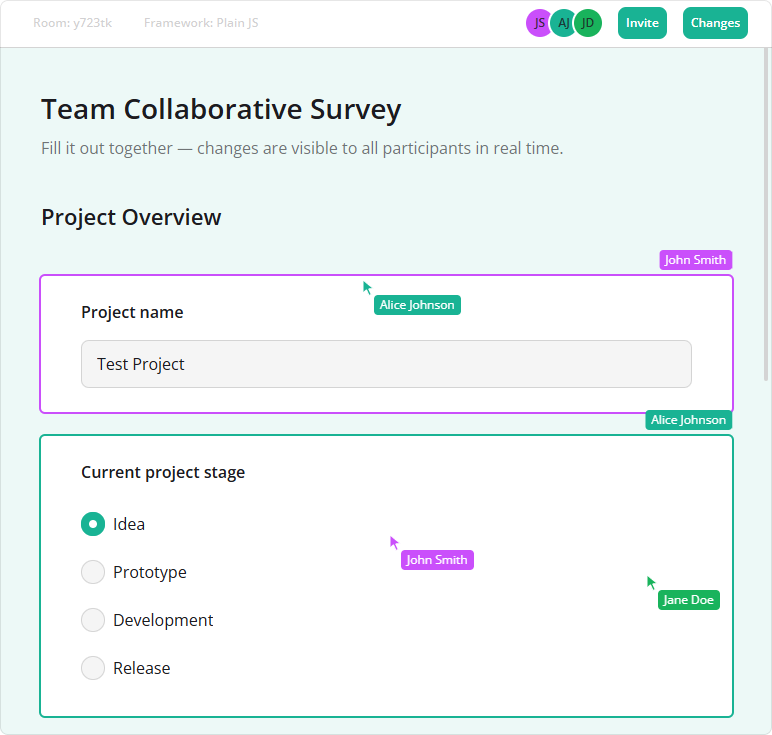
This feature is implemented in CollaborationPlugin from the survey-core/collaboration module and comes with a reference application. The plugin synchronizes answers and displays collaboration controls. The application provides WebSocket connections and a server that manages rooms and forwards answer and presence updates.
The example below creates the plugin for a survey instance, sends local changes through your WebSocket (ws), and applies incoming server updates:
import { Model } from "survey-core";
import { CollaborationPlugin } from "survey-core/collaboration";
import "survey-core/survey-core.css";
import "survey-core/collaboration.css";

const survey = new Model(surveyJson);
const collab = new CollaborationPlugin(survey, {
  info: [{ label: "Room", value: roomId }],
  getInviteLink: () => inviteUrl,
});

// Forward plugin events through your WebSocket connection
collab.onEvent.add((_, { message }) => {
  if (ws.readyState === WebSocket.OPEN) {
    ws.send(JSON.stringify(message));
  }
});

// Apply server messages; attach this handler before the initial state arrives
ws.onmessage = (event) => collab.apply(JSON.parse(event.data));

// Render survey with your framework's component

// Call when the survey is removed from the page
// collab.dispose();
// ws.close();
Demo: Collaborative Form Filling
Documentation: Collaborative Form Filling
Collaborative Form Editing
Collaborative form editing enables multiple authors to edit questions, choices, and form settings together. Presence indicators show their selections, focused fields, and cursors.
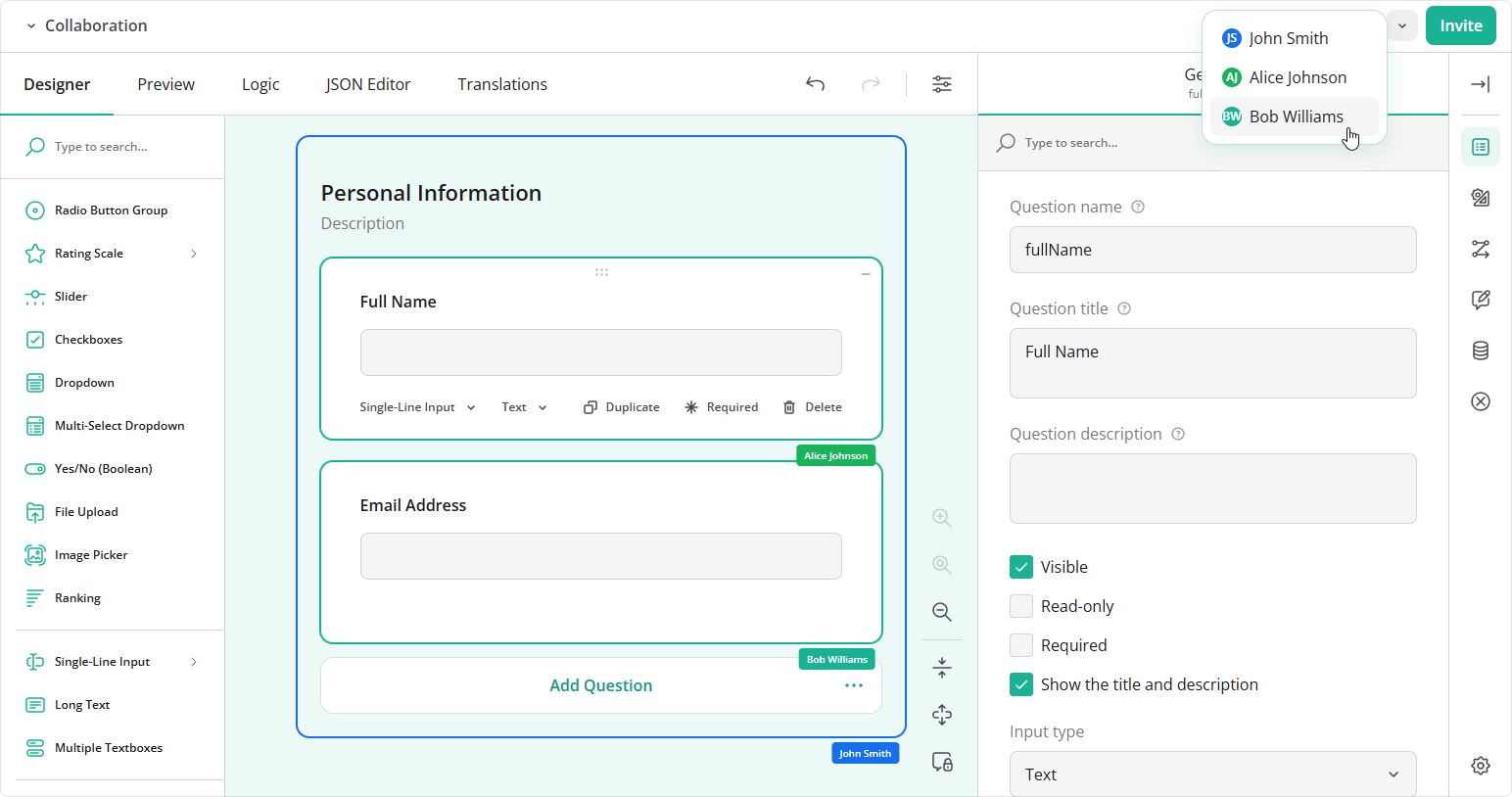
This feature is implemented in CollaborationPlugin from the survey-creator-core/collaboration module and comes with a reference application. The plugin records local edits, applies incoming changes, and displays collaboration controls. The application provides WebSocket connections and a server that manages rooms and relays edit records and presence updates.
The example below registers the plugin on a Survey Creator instance and connects it to a shared room using the reference application's connectCollab helper:
import { SurveyCreatorModel } from "survey-creator-core";
import { CollaborationPlugin } from "survey-creator-core/collaboration";
import { connectCollab } from "./shared/collab-client";
import "survey-core/survey-core.css";
import "survey-creator-core/survey-creator-core.css";
import "survey-creator-core/collaboration.css";

const creator = new SurveyCreatorModel();
const collab = new CollaborationPlugin(creator, {
  roomId,
  getInviteLink: () => inviteUrl,
});
creator.addPlugin("collaboration", collab);

const connection = connectCollab({
  creator,
  collab,
  roomId,
  name: participantName,
  onStatus: (status) => collab.setStatus(status),
  onHistoryChanged: (changes) => collab.setHistory(changes),
});

// Render Survey Creator with your framework's component

// Call when the editor is removed from the page
// connection.dispose();
// creator.dispose();
Survey Creator and its collaboration feature require commercial licenses for production use. A Survey Creator license alone does not activate the collaboration license.
Demo: Collaborative Form Editing
Documentation: Collaborative Form Editing
[PDF Generator] Dynamic Content API and Behavior
The new dynamicContent object controls which dynamic content is included in a PDF document, regardless of the current survey answers. For example, a blank form intended for offline completion can include follow-up questions and comment areas for choices that respondents have not yet selected.
Configure the following properties to select which content to include. All properties default to false:
| Property | Content included when enabled |
|---|---|
choiceComments |
Configured comment areas for unselected choices. |
choiceNestedContent |
Nested content for unselected choices. |
conditionalChoices |
Choices hidden by visibility conditions. |
conditionalElements |
Questions, panels, and pages hidden by visibility conditions. |
conditionalMatrixColumns |
Matrix columns hidden by visibility conditions. |
conditionalMatrixRows |
Matrix rows hidden by visibility conditions. |
Pass dynamicContent in the options object supplied to the SurveyPDF constructor. The following example includes comment areas and nested content for unselected choices:
import { SurveyPDF } from "survey-pdf";

const surveyPdf = new SurveyPDF(surveyJson, {
  dynamicContent: {
    choiceComments: true,
    choiceNestedContent: true
  }
});
This release also changes two default export behaviors:
Editable fields
Dynamic read-only conditions (enableIf) are ignored. All AcroForm fields are editable unlessreadOnlyis explicitly set totrue."Other" option
The comment area is always rendered, even if the "Other" option is unselected at export time. This behavior is independent ofdynamicContent.choiceComments.
Documentation: Dynamic Content
[Breaking Change] QuestionMatrixBaseModel Has Been Removed
The matrix implementation has been refactored to remove the shared QuestionMatrixBaseModel class and its "matrixbase" serializer registration. Its properties and behavior now belong to QuestionMatrixModel and QuestionMatrixDropdownModelBase, both of which inherit directly from Question. Existing matrix survey JSON definitions continue to work.
If your code imports, extends, or checks QuestionMatrixBaseModel, use the class appropriate to the matrix type:
| Matrix type | Class to use |
|---|---|
| Single-Select Matrix | QuestionMatrixModel |
| Multi-Select Matrix | QuestionMatrixDropdownModel |
| Dynamic Matrix | QuestionMatrixDynamicModel |
| Shared code for Multi-Select and Dynamic Matrix | QuestionMatrixDropdownModelBase |
For type annotations that cover all matrix questions, use QuestionMatrixModel | QuestionMatrixDropdownModelBase. Replace instanceof QuestionMatrixBaseModel checks with checks for these two classes.
Custom properties previously registered on "matrixbase" must now be registered on "matrix" and/or "matrixdropdownbase". To add a property to all three matrix types, register it on both:
import { Serializer } from "survey-core";

Serializer.addProperty("matrix", { name: "customProperty" });
Serializer.addProperty("matrixdropdownbase", { name: "customProperty" });
Bug Fixes and Minor Enhancements
Form Library
- Single-Line Input question with
inputType: "number"doesn't allow entering scientific notation (#11940) validate()rejects a response already accepted by a Complete trigger (#11935)- [Vue, Angular] Error message is not updated when an interpolated calculated value changes through
setVariable()(#11949) - [Survey Creator] MUI Theme Adapter: Value placeholder in the Property Grid is indistinguishable from an actual value (#11954)
Survey Creator
- Property Grid: Hint and magic wand buttons flicker with Bootstrap and shadcn/ui themes (#8042)
survey-creator-coretypings trigger TS2882 for.scssside-effect imports in TypeScript 6 / Angular 22 (#8019)- Multi-Select and Dynamic Matrix: "Placeholder Text" property is missing for Long Text columns (#8035)
Dashboard
- Date-range presets use UTC boundaries instead of the user's local timezone, causing off-by-one-day ranges (#859)
PDF Generator
- Multi-Select Matrix: Rating Scale and Checkbox columns are misaligned in the generated PDF (#478)
- Radio Button Group: Question nested in a choice option is not included in the generated PDF (#476)
- Single-Line Inputs contain unexpected backslashes before parentheses in generated PDFs (#469)
How to Update SurveyJS Libraries in Your Application
To update your application to SurveyJS v3.2.0, install the packages you use or replace your existing script and stylesheet links with the versioned links below:
Angular
npm i survey-core@3.2.0 survey-angular-ui@3.2.0
npm i survey-creator-core@3.2.0 survey-creator-angular@3.2.0
npm i survey-analytics@3.2.0
npm i survey-pdf@3.2.0
React
npm i survey-core@3.2.0 survey-react-ui@3.2.0
npm i survey-creator-core@3.2.0 survey-creator-react@3.2.0
npm i survey-analytics@3.2.0
npm i survey-pdf@3.2.0
Vue.js
npm i survey-core@3.2.0 survey-vue3-ui@3.2.0
npm i survey-creator-core@3.2.0 survey-creator-vue@3.2.0
npm i survey-analytics@3.2.0
npm i survey-pdf@3.2.0
HTML/CSS/JavaScript
<link href="https://unpkg.com/survey-core@3.2.0/survey-core.min.css" type="text/css" rel="stylesheet">
<script type="text/javascript" src="https://unpkg.com/survey-core@3.2.0/survey.core.min.js"></script>
<script type="text/javascript" src="https://unpkg.com/survey-js-ui@3.2.0/survey-js-ui.min.js"></script>

<script src="https://unpkg.com/survey-core@3.2.0/themes/index.min.js"></script>

<link href="https://unpkg.com/survey-creator-core@3.2.0/survey-creator-core.min.css" type="text/css" rel="stylesheet">
<script src="https://unpkg.com/survey-creator-core@3.2.0/survey-creator-core.min.js"></script>
<script src="https://unpkg.com/survey-creator-js@3.2.0/survey-creator-js.min.js"></script>

<link href="https://unpkg.com/survey-analytics@3.2.0/survey.analytics.min.css" rel="stylesheet">
<script src="https://unpkg.com/survey-analytics@3.2.0/survey.analytics.min.js"></script>

<link href="https://unpkg.com/survey-analytics@3.2.0/survey.analytics.tabulator.min.css" rel="stylesheet">
<script src="https://unpkg.com/survey-analytics@3.2.0/survey.analytics.tabulator.min.js"></script>

<script src="https://unpkg.com/survey-pdf@3.2.0/survey.pdf.min.js"></script>
<script src="https://unpkg.com/survey-pdf@3.2.0/pdf-form-filler.min.js"></script>
If you are upgrading from v2.x, review the breaking changes introduced in SurveyJS v3.0 and subsequent updates.