SurveyJS v2.5.11
Released: February 18, 2026
SurveyJS v2.5.11 enhances JSON validation in Survey Creator by introducing more accurate auto-fix suggestions for incorrect property values in the JSON Editor.
[Survey Creator] JSON Editor: Smarter error fix suggestions for property values
In Survey Creator, the JSON Editor allows users to edit the survey JSON schema manually. If the JSON contains a syntax error or an invalid configuration, the JSON Editor tab displays an error message and, when possible, offers a button to automatically correct the issue.
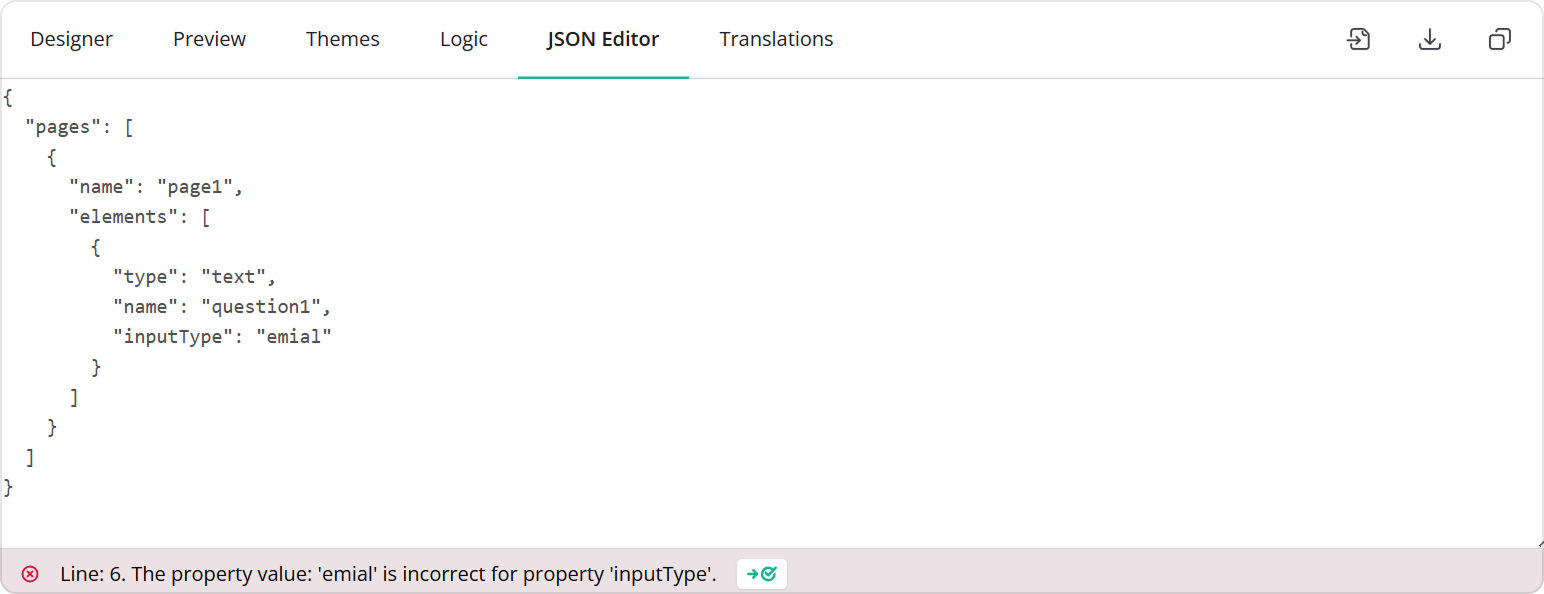
In SurveyJS v2.5.11, automatic error handling for invalid property values is enhanced with suggestions based on Levenshtein distance. When a property value does not match any of the allowed options (for example, an enum value), the editor compares the entered value against valid alternatives and suggests the closest match.
For example, if you mistype an enum-based property value—such as "emial" instead of "email":
{
  "pages": [
    {
      "name": "page1",
      "elements": [
        {
          "type": "text",
          "name": "question1",
          "inputType": "emial"
        }
      ]
    }
  ]
}
The JSON Editor detects that "emial" is not a valid inputType and suggests "email". You can apply the suggested correction with a single click.
This enhancement reduces friction when editing JSON manually, shortens debugging time, and helps prevent configuration errors caused by mistyped property values.
Bug Fixes and Minor Enhancements
Form Library
- Checkboxes: "Select All" affects disabled choice options (#10895)
Survey Creator
- UI Condition Editor doesn't allow creating rules based on other choices within the same question (#7178)
Dashboard
- Multi-Select Matrix visualization fails if
choicesare defined for all columns and one column doesn't support them (#685) - Table View: Uploaded file names appear as a single unreadable string (#686)
How to Update SurveyJS Libraries in Your Application
Angular
npm i survey-core@v2.5.11 survey-angular-ui@v2.5.11 --save
npm i survey-creator-core@v2.5.11 survey-creator-angular@v2.5.11 --save
npm i survey-analytics@v2.5.11 --save
npm i survey-pdf@v2.5.11 --save
React
npm i survey-core@v2.5.11 survey-react-ui@v2.5.11 --save
npm i survey-creator-core@v2.5.11 survey-creator-react@v2.5.11 --save
npm i survey-analytics@v2.5.11 --save
npm i survey-pdf@v2.5.11 --save
Vue.js
npm i survey-core@v2.5.11 survey-vue3-ui@v2.5.11 --save
npm i survey-creator-core@v2.5.11 survey-creator-vue@2.5.11 --save
npm i survey-analytics@2.5.11 --save
npm i survey-pdf@2.5.11 --save
HTML/CSS/JavaScript
<link href="https://unpkg.com/survey-core@2.5.11/survey-core.min.css" type="text/css" rel="stylesheet">
<script type="text/javascript" src="https://unpkg.com/survey-core@2.5.11/survey.core.min.js"></script>
<script type="text/javascript" src="https://unpkg.com/survey-js-ui@2.5.11/survey-js-ui.min.js"></script>

<script src="https://unpkg.com/survey-core@2.5.11/themes/index.min.js"></script>
<script src="https://unpkg.com/survey-creator-core@2.5.11/themes/index.min.js"></script>

<link href="https://unpkg.com/survey-creator-core@2.5.11/survey-creator-core.min.css" type="text/css" rel="stylesheet">
<script src="https://unpkg.com/survey-creator-core@2.5.11/survey-creator-core.min.js"></script>
<script src="https://unpkg.com/survey-creator-js@2.5.11/survey-creator-js.min.js"></script>

<link href="https://unpkg.com/survey-analytics@2.5.11/survey.analytics.min.css" rel="stylesheet">
<script src="https://unpkg.com/survey-analytics@2.5.11/survey.analytics.min.js"></script>

<script src="https://unpkg.com/survey-pdf@2.5.11/survey.pdf.min.js"></script>
<script src="https://unpkg.com/survey-pdf@2.5.11/pdf-form-filler.min.js"></script>